Difference Between IP Address and Port Number
- December 19, 2025
- 10 Mins Read
- Listen
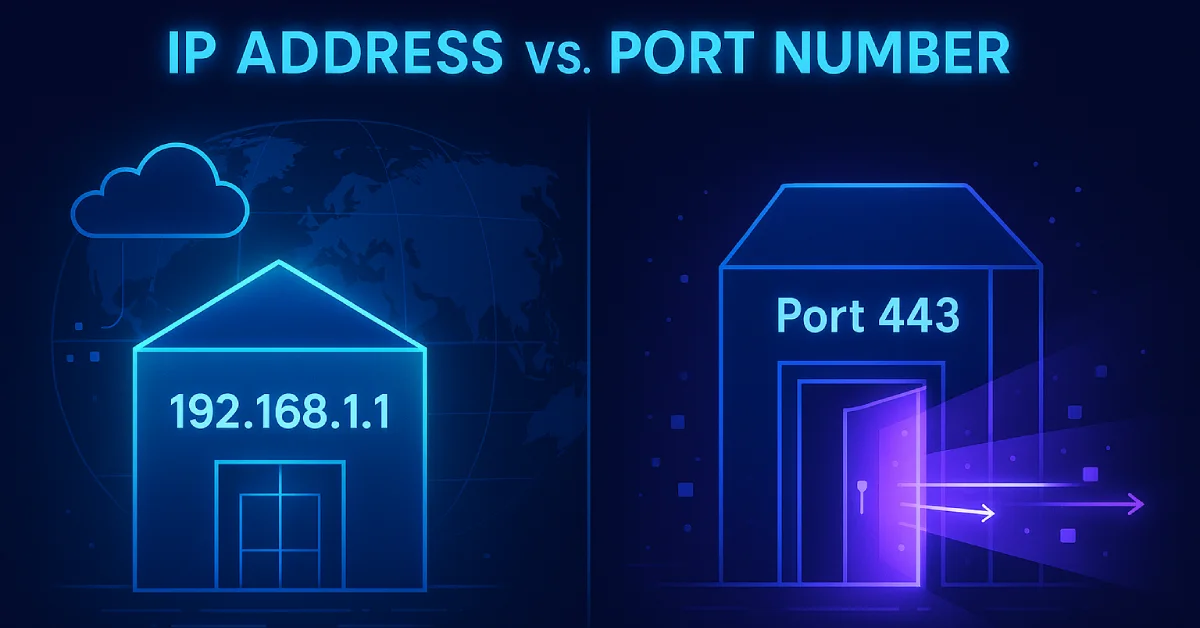
When you type a URL into your browser, two invisible mechanisms work together to deliver the right webpage to the right tab on your screen. Most people have heard of IP addresses, but far fewer understand port numbers and almost nobody understands how both work in tandem. Confusing or ignoring one of these concepts leads to frustrating debugging sessions, misconfigured servers, and gaping security holes.
| The Street Address Analogy Think of the internet like a city. An IP address is your building’s street address, it tells the postal service which building to go to. The port number is the apartment number inside that building, it tells the delivery person exactly which unit (or service) should receive the package. Without both, the delivery fails. |
In this guide, we will break down both concepts from the ground up covering what they are, how they work, where they operate in the networking stack, how they combine into sockets, their security implications, and the most common questions beginners ask.
What Is an IP Address?
An IP address (Internet Protocol address) is a unique numerical label assigned to every device connected to a network that uses the Internet Protocol (IP) for communication. It serves two core purposes: host identification (which device?) and location addressing (where is it on the network?).
IP addresses operate at Layer 3 (the Network Layer) of the OSI model. Routers use IP addresses to forward packets from one network to another until the data reaches its destination device.
IPv4 vs. IPv6
There are two versions of IP addresses in active use today:
| Feature | IPv4 | IPv6 |
| Bit Size | 32 bits | 128 bits |
| Format | Decimal (e.g., 192.168.1.1) | Hexadecimal (e.g., 2001:0db8::1) |
| Total Addresses | ~4.3 billion | ~340 undecillion |
| Example | 172.16.0.1 | fe80::1%lo0 |
| Status | Widely used, being exhausted | Growing adoption |
| Did You Know? As of late 2025, approximately 44–49% of global traffic to Google services occurs over IPv6 native connectivity. Adoption fluctuates slightly week-to-week, trending toward half of total traffic. Source: Wikipedia IPv6 deployment |
Types of IP Addresses
Public vs. Private IP Addresses
A public IP address is globally unique and routable across the internet. It is assigned by your Internet Service Provider (ISP). A private IP address is used only within a local network (home, office) and is not directly accessible from the internet. Network Address Translation (NAT) is the mechanism that translates private IPs to a public IP when communicating externally.
| Range | Type | Example |
| 10.0.0.0 – 10.255.255.255 | Private (Class A) | 10.0.0.5 |
| 172.16.0.0 – 172.31.255.255 | Private (Class B) | 172.16.1.10 |
| 192.168.0.0 – 192.168.255.255 | Private (Class C) | 192.168.1.100 |
| 0.0.0.0 | Wildcard / Listen on all interfaces | Used by servers |
| 127.0.0.1 | Loopback (localhost) | Your own machine |
| 169.254.x.x | APIPA (link-local, no DHCP found) | Self-assigned fallback |
Static vs. Dynamic IP Addresses
Static IP: Manually configured; does not change. Used for servers, printers, and network equipment that needs a fixed, predictable address.
Dynamic IP: Assigned automatically by a DHCP (Dynamic Host Configuration Protocol) server. Most home devices use dynamic IPs. They can change each time you reconnect.
How to Find Your IP Address
Windows: Run ipconfig in Command Prompt.
Linux/Mac: Run ifconfig or ip a in the terminal.
Public IP: Visit https://whatismyipaddress.com in your browser.
What Is a Port Number?
A port number is a 16-bit unsigned integer (0–65535) that identifies a specific process or service on a device. While the IP address gets data to the correct machine, the port number ensures the data is handed off to the right application running on that machine.
Port numbers operate at Layer 4 (the Transport Layer) of the OSI model, used by TCP and UDP protocols. A single device can run hundreds of services simultaneously — web server, email server, database, SSH — and port numbers are what keep their traffic sorted and separated.
Types of Port Numbers
| Range | Category | Description | Example |
| 0 – 1023 | Well-Known / System Ports | Reserved by IANA for standard protocols | 80 (HTTP), 443 (HTTPS), 22 (SSH) |
| 1024 – 49151 | Registered Ports | Registered by software vendors | 3306 (MySQL), 5432 (Postgres), 8080 |
| 49152 – 65535 | Dynamic / Ephemeral Ports | Assigned temporarily by the OS | Short-lived client connections |
Most Important Port Numbers to Know
| Port | Protocol | Service | Category |
| 20, 21 | TCP | FTP (File Transfer) | File Transfer |
| 22 | TCP | SSH (Secure Shell) | Remote Access |
| 23 | TCP | Telnet (unsecured) | Remote Access |
| 25 | TCP | SMTP (Email Sending) | |
| 53 | TCP/UDP | DNS (Domain Name System) | Name Resolution |
| 67, 68 | UDP | DHCP (IP Assignment) | Network Config |
| 80 | TCP | HTTP (Web Traffic) | Web |
| 110 | TCP | POP3 (Email Retrieval) | |
| 143 | TCP | IMAP (Email Sync) | |
| 443 | TCP | HTTPS (Secure Web) | Web |
| 3306 | TCP | MySQL Database | Database |
| 5432 | TCP | PostgreSQL Database | Database |
| 6379 | TCP | Redis Cache | Database |
| 8080 | TCP | Alternative HTTP / Dev servers | Web |
| 27017 | TCP | MongoDB | Database |
Who Assigns Port Numbers?
Well-known port numbers (0–1023) are managed by the Internet Assigned Numbers Authority (IANA). Registered ports are requested by software vendors. Dynamic/ephemeral ports are assigned on-the-fly by the operating system kernel whenever your device initiates an outgoing connection.
How to Check Open Ports on Your System
Windows: netstat -an
Linux/Mac: ss -tuln or netstat -tuln
Difference Between IP Address and Port Number
Here is the comprehensive side-by-side comparison:
| Feature | IP Address | Port Number |
| Primary Purpose | Identifies a device on a network | Identifies a service or process on a device |
| OSI Layer | Layer 3 — Network Layer | Layer 4 — Transport Layer |
| Bit Size | 32-bit (IPv4) / 128-bit (IPv6) | 16-bit |
| Value Range | 0.0.0.0 – 255.255.255.255 (IPv4) | 0 – 65535 |
| Total Possible Values | ~4.3 billion (IPv4) | 65,536 |
| Assigned By | DHCP or network admin (IANA for public) | IANA (well-known) or OS kernel (dynamic) |
| Format | Decimal octets: 192.168.1.1 | Integer: 80, 443, 3306 |
| Notation Together | 192.168.1.1:80 | 192.168.1.1:80 |
| Scope | Public (internet) or Private (LAN) | Well-known, registered, or dynamic |
| Can Be Public/Private? | Yes — public and private IPs exist | No — ports are local to the device |
| Transport Protocol | Not applicable (IP is layer 3) | Specific to TCP or UDP or both |
| Protocol Example | IPv4, IPv6 | TCP, UDP |
| Find With (Command) | ipconfig / ifconfig / ip a | netstat -an / ss -tuln |
| Analogy | Street address of a building | Apartment number inside the building |
| Security Concern | IP spoofing, IP blocking | Port scanning, open port exploitation |
How IP Address and Port Work Together: The Socket
| Key Concept: The Socket A socket is the combination of an IP address + a port number + a transport protocol (TCP or UDP). It is the actual communication endpoint. Every active network connection is defined by a pair of sockets: one on the client side, one on the server side. |
The notation for a socket looks like this:
192.168.1.10:54231 → 142.250.190.46:443
In this example, 192.168.1.10 is your device’s private IP, 54231 is the ephemeral source port your OS assigned, 142.250.190.46 is Google’s server IP, and 443 is HTTPS, the destination port. This 4-tuple (source IP, source port, destination IP, destination port) uniquely identifies every single connection. This is why you can have 50 browser tabs all connected to the same server IP and port simultaneously, each tab using a different source port.
TCP vs. UDP: How Protocol Choice Affects Port Behavior
Port numbers alone don’t tell the full story. The same port number can behave completely differently depending on whether it uses TCP or UDP. This is a critical concept that most introductory articles skip entirely.
| Feature | TCP (Transmission Control Protocol) | UDP (User Datagram Protocol) |
| Connection Type | Connection-oriented (3-way handshake) | Connectionless (fire and forget) |
| Reliability | Guaranteed delivery, ordering, error checking | No guarantee — packets may drop or arrive out of order |
| Speed | Slower due to overhead | Faster — less overhead |
| Use Cases | Web (HTTP/HTTPS), Email, SSH, FTP | DNS, Video Streaming, VoIP, Gaming |
| Port 53 (DNS) | Used for large DNS responses (zone transfers) | Used for standard DNS queries |
| Firewall Rule | Must specify TCP port 443 | Must specify UDP port 53 separately |
| Why This Matters When configuring a firewall, opening port 80 for TCP does NOT automatically open port 80 for UDP. Protocol and port number must always be specified together for precise, secure firewall rules. |
Real-World Scenarios: Step-by-Step Walkthroughs
Scenario 1: Visiting https://google.com
Here is exactly what happens, step by step, the moment you hit Enter:
- Your browser asks a DNS server: “What is the IP address for google.com?”
- DNS responds: 142.250.190.46
- Your OS picks an ephemeral source port (e.g., 54231) for this connection.
- Your browser initiates a TCP connection to 142.250.190.46:443 (HTTPS port).
- Google’s server responds from port 443 back to your IP:54231.
- Your OS sees the reply arriving at port 54231, identifies it belongs to Chrome, and hands it to the right browser tab.
Scenario 2: Running a Local Web App + Database Simultaneously
You have a Node.js web app and a PostgreSQL database running on the same machine (IP: 192.168.1.5):
- Web app listens on 192.168.1.5:3000
- PostgreSQL listens on 192.168.1.5:5432
- Redis cache listens on 192.168.1.5:6379
All three services share the same IP address but are completely independent because they use different port numbers. This demonstrates precisely why ports are indispensable — a single IP can host dozens of services simultaneously.
Security Implications of IP Addresses and Port Numbers
IP Address Security Threats
- IP Spoofing: IP Spoofing: An attacker forges the source IP in packets to impersonate another device or bypass IP-based authentication.
- DDoS Attacks: DDoS Attacks: Attackers flood a target IP with traffic from thousands of sources to overwhelm the server.
- IP-Based Blacklisting: IP-Based Blacklisting: Firewalls can block traffic from known malicious IP ranges but attackers can change IPs easily.
Port Number Security Threats
- Port Scanning: Port Scanning: Tools like Nmap probe a device’s ports to discover which services are running. Attackers use this as reconnaissance before an attack.
- Open Port Exploitation: Open Port Exploitation: Every open port is a potential entry point. Unpatched services running on open ports are primary targets.
- Port 0: Port 0: Reserved and should never be in use. Traffic on port 0 is almost always malicious or the result of a misconfiguration.
- Default Port Attacks: Default Port Attacks: Attackers know default ports (e.g., 3306 for MySQL). Exposing databases on default ports publicly is extremely dangerous.
Security Best Practices
- Close unused ports: Close all unused ports using a firewall. Follow the principle of least privilege: if a service doesn’t need to be publicly accessible, block its port.
- Change default ports: Change default ports for sensitive services like SSH (from 22 to a non-standard port) to reduce automated attack attempts.
- Use IP allowlisting: Use IP allowlisting (whitelist) to restrict which IP addresses can reach sensitive ports like database ports.
- Layered rules: Combine IP filtering + port filtering in firewall rules for defense in depth.
- Regular audits: Regularly audit open ports using netstat or ss and close anything unexpected.
| Critical Warning Never expose your database port (3306, 5432, 27017, etc.) directly to the internet. Bind it to 127.0.0.1 (localhost only) unless you have an explicit, secured reason to expose it externally. |
Quick Reference Cheat Sheet
The 20 most important port numbers every developer, student, and network engineer should know:
| Port(s) | Protocol | Service | Use Case |
| 20, 21 | TCP | FTP | File transfer (21=control, 20=data) |
| 22 | TCP | SSH | Secure remote login & file transfer (SCP/SFTP) |
| 23 | TCP | Telnet | Unencrypted remote access (avoid — legacy) |
| 25 | TCP | SMTP | Sending emails between servers |
| 53 | TCP/UDP | DNS | Domain name to IP resolution |
| 67/68 | UDP | DHCP | Automatic IP address assignment |
| 80 | TCP | HTTP | Standard unencrypted web traffic |
| 110 | TCP | POP3 | Download emails to local client |
| 143 | TCP | IMAP | Sync emails across devices |
| 443 | TCP | HTTPS | Encrypted web traffic (TLS/SSL) |
| 465/587 | TCP | SMTPS | Encrypted email submission |
| 3306 | TCP | MySQL | MySQL database connections |
| 5432 | TCP | PostgreSQL | PostgreSQL database connections |
| 6379 | TCP | Redis | In-memory cache/data store |
| 8080 | TCP | HTTP Alt | Dev servers, proxies, testing |
| 8443 | TCP | HTTPS Alt | Alternative HTTPS, often for admin UIs |
| 27017 | TCP | MongoDB | NoSQL document database |
| 9200 | TCP | Elasticsearch | Search & analytics engine |
| 3000 | TCP | Node.js / React | Common default for local dev servers |
| 5000 | TCP | Flask / various | Python dev servers, Docker registry |
Summary & Key Takeaways
After this deep dive, here is what you should take away:
| Question | IP Address | Port Number |
| What does it identify? | A device (host) on a network | A service or process on that device |
| What OSI layer? | Layer 3 — Network | Layer 4 — Transport |
| What analogy? | Street address of a building | Apartment number inside the building |
| Who assigns it? | DHCP server or network admin | OS kernel or IANA |
| Combined, they form… | A Socket: IP:Port:Protocol | A Socket: IP:Port:Protocol |
The most important insight from this entire article is that neither an IP address alone nor a port number alone is sufficient for network communication. It is always the combination of both, forming a socket that creates a real, functional communication endpoint. Understanding this is the foundation of all network programming, server configuration, and security engineering.
Frequently Asked Questions