What is Call Center Voice AI? Benefits, Features & Use Cases
- March 31, 2026
- 16 Mins Read
- Listen

What happens when a customer has to wait on hold for minutes just to ask a simple question? In most cases, they hang up, and your business loses an opportunity. Today’s customers expect support that is fast, effortless, and available 24/7. They don’t want to navigate endless IVR menus or repeat their concerns multiple times. This growing demand for instant, seamless communication is exactly why call center voice AI is becoming a critical part of modern customer service strategies.
Traditional call centers work good but they often fall short in meeting these expectations. High call volumes, limited agent bandwidth, rising operational costs, and scalability challenges make it difficult to maintain consistent service quality.
AI voice bots act as AI-powered voice assistants; they can handle large volumes of customer interactions simultaneously, respond instantly, and ensure that no query goes unanswered. By automating routine tasks and enabling smarter, faster responses, voice AI customer support not only improves operational efficiency but also delivers a more personalized and satisfying experience.
Sounds interesting? Let’s explore more about the call center voice AI.
What is Call Center Voice AI?
At its core, call center voice AI is a technology that allows machines to handle customer calls just like a human agent would – by understanding, processing, and responding to voice conversations in real time.
Instead of relying on rigid menus or manual input, voice AI can listen to what a customer says, interpret the intent, and provide the right response instantly. It makes interactions feel more natural and less robotic.
How Voice AI Works in Call Centers
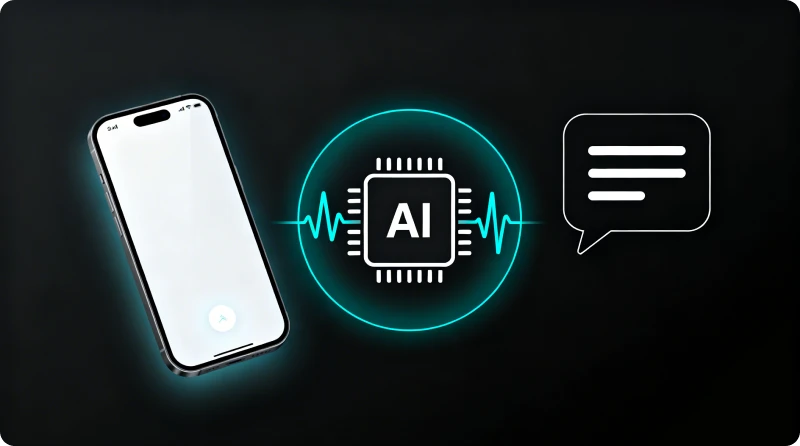
So, what actually happens when a customer talks to a voice AI system? It follows a step-by-step process:
Step 1: Customer Speaks
First, the customer speaks. They might say something like, “I want to check my order status” or “I need help with my bill.” Unlike traditional IVR systems, they don’t have to press multiple buttons, just speak naturally.
Step 2: Speech-to-Text Conversion
Next, the system listens to the caller’s voice and instantly converts it into written text. This is the foundation that allows the AI to understand what’s being said.
Step 2: AI analyzes the Intent
Once the input is in text form, using natural language processing or NLP, the system figures out what the customer actually means, not just the words, but the context behind them. For example, it can distinguish between a complaint, a request, or a simple query.
After understanding the intent, the system moves to response generation. It decides what the best possible answer or action should be. This could be pulling information from a database, triggering a workflow, or even routing the call to a human agent if needed.
Step 3: AI Replies
Finally, the system delivers a text-to-speech reply. The response is converted back into a natural-sounding voice and communicated to the customer in real time, making the interaction feel smooth and human-like.
All of this happens within seconds. The result is a fast, seamless conversation that feels less like talking to a machine and more like speaking with a helpful assistant.
Key Voice AI Technologies and How They Work
Now that we have understood the working of AI voice, let’s take a look at the technologies that work at its core:
1. Speech-to-Text (STT) – “Listening” to the Customer
This is where everything starts. When a customer speaks, the system first needs to convert the voice into text. That’s exactly what Speech-to-Text does.
You can think of it like this:
The customer says, “I want to check my order status.” The system turns that into readable text instantly, and it happens in milliseconds.
Why it matters:
- Captures customer queries accurately
- Works with different accents and languages
- Handles background noise better than old systems
2. Natural Language Processing (NLP) – “Understanding” the Intent
Now that the system has the text, it needs to understand it. This is where Natural Language Processing (NLP) comes in.
NLP helps the AI figure out:
- What the user is saying
- What they actually mean
- What they want next
For example:
“Where is my order?”
“Track my package”
“Has my delivery shipped?”
All mean the same thing, and NLP understands that.
Why it matters:
- Detects intent, not just words
- Handles different ways of asking the same question
- Improves conversation accuracy
3. Machine Learning (ML) – “Learning” from Every Call
Voice AI doesn’t stay static. It keeps improving. That’s because of Machine Learning (ML). Every interaction helps the system learn new phrases, improve accuracy, and adapt to user behavior. Over time, it becomes smarter and faster. For example, if many users ask similar questions in new ways, the AI learns to recognize them.
Why it matters:
- Continuous improvement
- Better personalization
- Reduced errors over time
4. Text-to-Speech (TTS) – “Speaking” Back to the Customer
Now comes the response. Once the AI understands the query, it needs to reply. That’s where Text-to-Speech (TTS) comes in. It converts text into a natural-sounding voice.
So instead of robotic replies, customers hear human-like tone, proper pauses and emphasis, and natural conversations.
Why it matters:
- Creates a better customer experience
- Feels more human, less robotic
- Builds trust and engagement
5. Conversational AI Engine – “Managing” the Conversation
This is the brain of the system. The conversational AI engine decides:
- What to say next
- How to respond
- When to ask follow-up questions
It keeps the conversation flowing naturally.
Example:
Customer: “I want to cancel my order.”
AI: “Sure. Can you share your order ID?”
It feels like a real conversation, not a script.
Why it matters:
- Creates smooth, human-like interactions
- Handles multi-step conversations
- Reduces call drop-offs
6. Backend Integrations (CRM & APIs) – “Taking Action”
Understanding is not enough. The system also needs to act. Voice AI connects with CRM systems, billing tools, and order management systems so it can fetch data, update records, and complete tasks.
Example:
- Check order status
- Book appointments
- Process payments
Why it matters:
- Delivers real-time answers
- Automates tasks end-to-end
- Reduces agent workload
Key Features of Call Center Voice AI
To understand the impact of Voice AI in call centers, it’s important to look at the key features that drive its performance. Let’s look at the key features:
24/7 Availability
Voice AI never sleeps. It can handle calls anytime – be it day or night, weekends or holidays. So your customers don’t have to wait for business hours. This means no missed calls, instant responses, and better customer satisfaction.
Instant Call Handling
No more long wait times for customers. Voice AI can pick up calls immediately and start the conversation. and that even during peak hours. This means reduced call queues, faster resolutions, and happier customers.
Smart Call Routing
Not every query should go to a human agent. Voice AI understands the request and routes calls smartly. This is how it goes:
- Simple queries → handled by AI
- Complex issues → transferred to the right agent
This means less agent workload, faster issue resolution, and better call management.
Natural Conversations
This is where Voice AI really shines. It doesn’t sound robotic anymore. It understands context and responds like a human.
Example:
Customer: “I called yesterday about my refund.”
AI: “Got it. Let me check your previous request.”
This means more engaging interactions, less frustration, and better user experience.
Multilingual Support
Your customers may speak different languages, and voice AI is capable of handling multiple languages easily. This means there’s no need to hire separate agents for each language. Moreover, companies benefit through wider customer reach, better accessibility, and consistent service across regions.
CRM Integration
Voice AI connects with your CRM system. So it already knows customer history, previous interactions, and preferences.
Example:
“Hi John, I see you recently placed an order.”
This means personalized conversations, faster support, and better customer relationships.
Real-Time Analytics
Voice AI tracks every interaction. Through this, you get insights like call volume, customer intent, and resolution time. This means better decision-making, improved performance, and data-driven strategies.
Call Automation
Voice AI can complete tasks on its own – there’s no human needed for routine work.
Examples:
- Booking appointments
- Checking order status
- Sending reminders
This means more time saved, reduced operational costs, and improved efficiency.
Scalability
Whether it is about handling 10 calls or 10,000 calls, voice AI can scale instantly. So there are no hiring and no training delays.
This means:
- Perfect for growing businesses
- Handles peak traffic easily
- Consistent performance
Omnichannel Support
Voice AI is not limited to just calls. It can work across chat and Messaging apps. This means unified customer experience, seamless communication, and better engagement.
Benefits of Using Voice AI in Call Centers

Let’s get straight to the point. Why are so many businesses switching to Voice AI? Because it solves real problems “fast”. Here are the key benefits:
Reduced Wait Times
Voice AI answers calls instantly, without putting customers on hold. There are no queues or delays, even during peak hours. This leads to faster support and a smoother customer experience.
Lower Operational Costs
With Voice AI handling repetitive queries, businesses don’t need large support teams. It reduces hiring, training, and infrastructure costs while maintaining efficiency.
High Call Handling Capacity
Voice AI can manage thousands of calls at the same time. It scales instantly without affecting performance, ensuring no customer call goes unanswered.
Improved Customer Experience
Voice AI delivers quick, accurate, and natural responses. Customers don’t have to repeat themselves, which makes interactions more seamless and satisfying.
Increased Agent Productivity
By taking over routine tasks, Voice AI frees up human agents to focus on complex issues. This improves productivity and allows teams to work more efficiently.
24/7 Availability
Voice AI works around the clock without breaks. Customers can get support anytime, which improves accessibility and builds trust.
Faster Issue Resolution
Voice AI quickly understands queries and provides instant answers or routes calls correctly. This reduces call duration and resolves issues faster.
Personalized Interactions
By integrating with CRM systems, Voice AI can access customer data and history. This allows it to deliver more relevant and personalized responses.
Real-Time Insights
Voice AI tracks and analyzes every interaction. Businesses gain valuable insights into customer behavior, helping them improve service and strategy.
Consistent and Error-Free Service
Voice AI follows predefined logic and workflows. This reduces human errors and ensures consistent service quality across every interaction.
Voice AI vs Traditional Call Centers
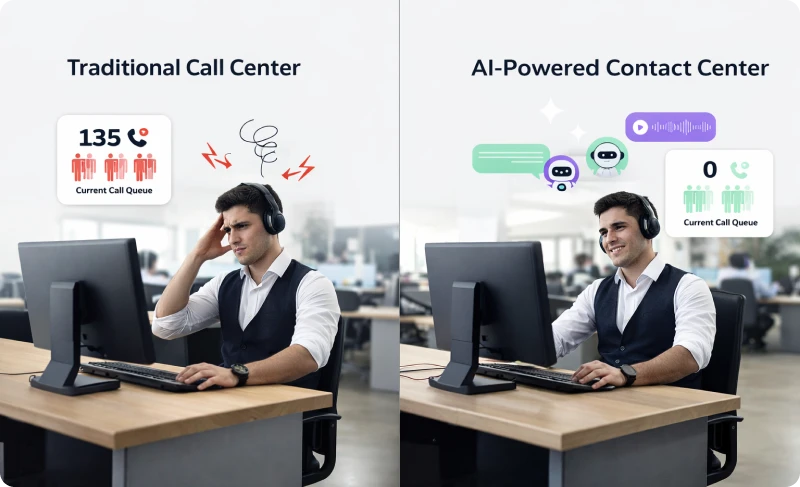
Voice AI and traditional call centers both aim to support customers. But the way they operate is very different.
Here’s a quick comparison
Speed and Availability
Traditional call centers depend on agent availability and working hours. This often leads to wait times and missed calls. Voice AI responds instantly and works 24/7, ensuring customers always get support.
Call Handling Capacity
Human agents can handle only a limited number of calls at a time. During peak hours, queues increase. Voice AI can manage thousands of calls simultaneously without any drop in performance.
Cost and Scalability
Traditional setups require ongoing investment in hiring, training, and infrastructure. Scaling takes time and money. Voice AI scales instantly without additional staffing costs.
Consistency and Accuracy
Agent responses can vary based on experience and workload. This may lead to inconsistencies. Voice AI follows predefined logic, ensuring accurate and consistent responses every time.
Customer Experience
Traditional IVR systems often feel rigid. Voice AI offers natural, conversational interactions, making the experience smoother and more engaging.
Task Automation
In traditional call centers, agents handle most tasks manually. Voice AI can automate routine tasks like order tracking, bookings, and basic support queries.
Real Talk: What Are Call Center Agents Saying About AI?
A common question you’ll see in online communities is: “Is AI going to replace call center jobs?”
And honestly, the reactions are mixed.
Some agents feel anxious about the future. Others don’t see AI as a threat at all. In fact, many say AI is already part of their daily work, and it’s actually helping them.
For example, tools like call transcription, automated summaries, and smart suggestions are making agents’ lives easier. They reduce manual work and save time during and after calls.
There’s also a bit of humor in the conversation. Some agents jokingly say, “If AI can take over stressful calls, go ahead!” which shows how demanding the job can be.
But here’s the key takeaway: AI isn’t replacing agents. It’s supporting them. Instead of taking over completely, Voice AI is:
- Handling repetitive queries
- Assisting with real-time information
- Reducing workload and stress
So, rather than eliminating jobs, AI is shifting the role of agents toward more meaningful and complex interactions.
In essence, the real-world perspective is clear: AI is less about replacement and more about making the call center work smarter and easier.
Common Use Cases of Call Center Voice AI
Voice AI is already being used in real call centers for practical tasks. Here are the most common use cases.
Customer Support Automation
Voice AI handles basic queries like order status, FAQs, and account information. In fact, over 58% of inbound calls are repetitive and can be automated. This reduces agent workload and speeds up support.
Call Transcription & Summarization
AI automatically transcribes and summarizes calls after they end. This can reduce wrap-up time by up to 50% and improve efficiency. Agents spend less time typing and more time helping customers.
Smart Call Routing
It understands customer intent and routes calls to the right department or agent. This minimizes transfers and improves first-call resolution or FCR.
Appointment Booking & Scheduling
Voice AI can book, reschedule, or cancel appointments without human involvement. It works like a 24/7 virtual receptionist, especially useful in healthcare and service industries.
Lead Qualification & Sales Support
It can engage incoming leads, ask qualifying questions, and pass only high-intent prospects to sales teams. This helps businesses focus on better conversion opportunities.
Outbound Calls & Reminders
Voice AI is widely used for payment reminders, follow-ups, and appointment confirmations. It ensures consistent communication without manual effort.
Real-Time Agent Assistance
Voice AI supports agents during live calls with suggestions, data lookup, and prompts. This improves response accuracy and reduces handling time.
Quality Monitoring & Analytics
AI analyzes every call for sentiment, tone, and performance. It can evaluate far more calls than manual QA, improving overall service quality.
Voice AI vs Chatbots: What’s the Difference?
Voice AI and chatbots may seem similar since both use AI to automate customer interactions. But the key difference lies in how they communicate.
Voice AI works through spoken conversations, allowing customers to simply talk and get responses in real time. It feels more natural and is often faster, especially for complex or urgent queries. Chatbots, on the other hand, rely on text-based communication, where users type their questions and read responses. They are simple, structured, and work well for quick tasks like FAQs or basic support.
In terms of experience, Voice AI offers a more human-like and engaging interaction, while chatbots are better suited for straightforward, step-by-step conversations. Voice AI is commonly used in call centers and voice channels, whereas chatbots are widely used on websites and messaging platforms.
Instead of choosing one over the other, many businesses use both together: chatbots for quick text support and Voice AI for deeper, real-time conversations, creating a seamless customer experience across channels.
Best Practices for Implementing Call Center Voice AI
Start with Clear Use Cases
Don’t try to automate everything at once; start small. Focus on high-volume, repetitive queries like order status, FAQs, or appointment booking. These are easy wins and deliver quick ROI.
Design Conversations, Not Scripts
Voice AI should feel natural, not robotic. Instead of rigid scripts, design flexible conversations. Think about how real people talk. Add variations, pauses, and simple language.
Keep it Simple for Users
Avoid overcomplicating interactions. Let users speak freely. Don’t force them into long menus or strict commands. The easier it is to talk, the better the experience.
Ensure Smooth Human Handover
AI won’t handle everything, and that’s okay. Always provide an easy way to connect to a human agent. Make the transition smooth by passing context, so customers don’t have to repeat themselves.
Train the AI with Real Data
Your Voice AI is only as good as the data you feed it. Use real call recordings, customer queries, and common phrases to train the system. This improves accuracy and understanding over time.
Focus on Multilingual and Accent Support
Customers speak in different languages and accents. Make sure your Voice AI can handle this diversity. It helps you reach a wider audience and improves accessibility.
Integrate with Your Existing Systems
Voice AI should not work in isolation. Connect it with your CRM, helpdesk, and backend systems. This allows it to fetch data, personalize responses, and complete tasks end-to-end.
Monitor and Optimize Continuously
Launching Voice AI is just the beginning. You need to track metrics like call success rate, drop-offs, and customer satisfaction. Use these insights to improve conversations and performance regularly.
Prioritize Security and Compliance
Call centers deal with sensitive customer data. It is therefore important to ensure that your Voice AI follows proper security standards and compliance requirements. Always remember, protecting data builds trust.
Test Before Full Deployment
Never go live without proper testing. First, run pilot programs, test different scenarios, identify gaps, and fix them before scaling.
REVE Cloud PABX & Contact Center Solution
If you’re planning to implement call center Voice AI, you need more than just a basic tool; you need a complete platform that brings everything together. That’s exactly where REVE’s contact center solution fits in.
At its core, REVE offers an advanced AI Voice Bot designed specifically for call centers. It can handle incoming calls, understand customer queries in real time, and respond with natural, human-like conversations. Whether it’s answering FAQs, checking order status, or routing calls, the voice bot takes care of high-volume, repetitive tasks effortlessly, reducing wait times and improving customer experience.
What makes it even more powerful is how smoothly it works alongside human agents. When a query becomes complex, the system instantly transfers the call to the right agent with full context. This ensures customers don’t have to repeat themselves, and agents can resolve issues faster.
Beyond voice, REVE also offers an AI Chatbot, enabling businesses to deliver consistent support across both voice and digital channels. This creates a true omnichannel experience as customers can switch between call and chat without losing continuity.
The platform also comes with smart features like:
- Intelligent call routing and IVR
- CRM integration for personalized interactions
- Integrated fast-track ticketing system
- Real-time analytics and reporting
- Toll-free, Vanity, and DID Numbers
Since it’s cloud-based, the solution is easy to deploy and scale. You can handle growing call volumes without worrying about infrastructure or additional resources. Get a personalized, free demo to understand how REVE’s solution can help your business.
Frequently Asked Questions