AI in Mobile App Development: Features, Benefits, & Use Cases
- March 30, 2026
- 11 Mins Read
- Listen

Ever wondered how your favorite apps seem to “just know” what you want, before you even ask? That’s AI quietly working behind the scenes. From smart recommendations on shopping apps to voice assistants that understand you like a human, AI has rapidly become a core part of mobile app experiences. In fact, a growing number of apps today use AI to personalize content, automate tasks, and make interactions smoother. It’s no surprise that AI in mobile app development is now more of an expectation than a bonus.
So why are businesses jumping on the AI bandwagon? Simply put, it helps them deliver faster, smarter, and more engaging user experiences while boosting efficiency and reducing costs. Whether it’s chatbots handling customer queries or predictive analytics improving decision-making, AI is transforming how apps function.
In this blog, we’ll break down what AI in mobile app development really means, how it works, and why it’s becoming a must-have for modern businesses.
What is AI in Mobile App Development?
At its core, AI in mobile app development simply means making apps “smart” enough to learn, adapt, and make decisions just as a human would. In layman’s terms, instead of an app just following fixed instructions, it can understand user behavior, predict needs, and improve over time. For example, think about a music app that starts suggesting songs you actually like without you searching for them; that’s AI learning your preferences.
From a technical perspective, AI in mobile apps involves integrating technologies like machine learning (ML), natural language processing (NLP), and computer vision into the app’s architecture. These models are either embedded within the app or connected via cloud-based APIs. They process user data, identify patterns, and continuously refine outputs based on new inputs, enabling features like voice recognition, recommendation engines, chatbots, and image analysis.
The key difference between traditional apps and AI-powered apps lies in how they operate. Traditional apps are rule-based; they only do what they are explicitly programmed to do. In contrast, AI-powered apps are data-driven and adaptive. They can learn from user interactions and evolve over time. For instance, a traditional shopping app may show the same homepage to every user, while an AI-powered app personalizes product recommendations based on browsing history, past purchases, and even time of day, creating a much more engaging and intelligent user experience.
Why AI is Important for Mobile Apps?
Let me ask you a question: would you keep using an app that feels slow, generic, and totally out of sync with your needs? Probably not. Today’s users expect apps to be fast, intuitive, and almost “mind-reading.” In fact, around 71% of users expect personalized experiences, and 76% get frustrated when apps don’t deliver that. That’s exactly where AI steps in. It helps apps understand user behavior, predict what users want next, and deliver experiences that feel tailor-made instead of one-size-fits-all.
From a business perspective, AI isn’t just a cool feature; it’s a competitive necessity. With 63% of developers already integrating AI and many more planning to adopt it, the shift is happening fast. AI enables automation, like chatbots handling up to 80% of customer interactions, and boosts efficiency while reducing manual effort. Plus, apps using AI see better engagement, smarter decision-making, and stronger user retention.
Simply put, if your app isn’t evolving with AI, there’s a good chance your competitors already are, and they’re offering a much smarter experience.
How AI Works in Mobile Applications
So, how does AI actually make apps feel so smart and intuitive? There’s a step-by-step process happening behind the scenes, where data is collected, analyzed, and continuously refined to deliver better user experiences. Let’s break it down in a simple way:
Data Collection
Everything starts with data. Mobile apps gather information based on how users interact with them: what you click, how long you stay, what you search for, and even your preferences over time. For example, a shopping app tracks the products you view or add to your cart to understand your interests.
Data Processing
Once the data is collected, it needs to be cleaned and organized. This step removes irrelevant or messy data and structures it into a usable format. Think of it like sorting out a cluttered room before actually using the items; you need everything in the right place for AI to work effectively.
Machine Learning Models
Now comes the “brain” of the system. Machine learning models are trained using this structured data to identify patterns and trends. For instance, if users with similar behavior tend to like certain products, the model learns to make similar recommendations to others with matching patterns.
Real-Time Decision Making
This is where users actually feel the impact of AI. Based on the trained models, the app delivers personalized results instantly, like showing relevant products, suggesting videos, or responding through chatbots. It all happens in real time, making the experience smooth and engaging.
Continuous Learning
AI doesn’t stop after one cycle; it keeps learning. As users continue interacting with the app, new data is fed back into the system, helping it improve accuracy over time. That’s why recommendations on apps often get better the more you use them.
That’s how AI quietly shifts mobile apps from being functional tools to truly intelligent experiences.
Key AI Technologies Used in Mobile App Development
To truly understand how AI enhances mobile apps, it helps to look at the key technologies driving these capabilities. Let’s break them down:
Machine Learning (ML)
This is the backbone of most AI-powered apps. Machine Learning helps apps learn from user behavior and improve over time without being explicitly programmed for every scenario.
Example: Think of a shopping app that starts recommending products based on what you’ve browsed or purchased before; it’s learning your preferences as you go.
Natural Language Processing (NLP)
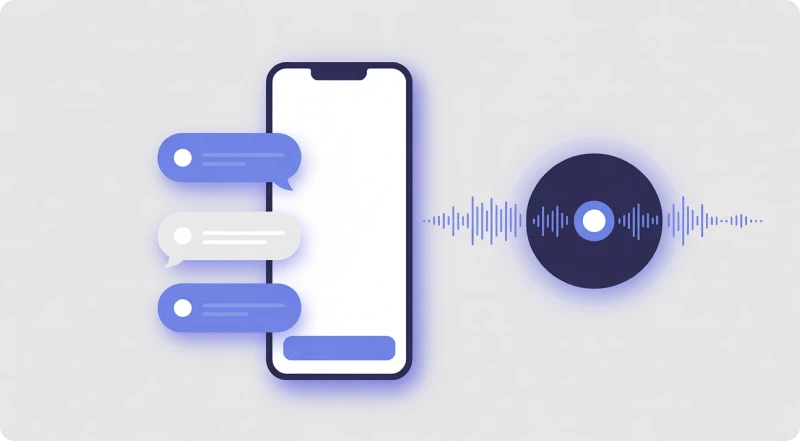
NLP allows apps to understand and respond to human language, just like a conversation. It’s what makes chatbots and virtual assistants feel more “human.”
Example: When you type a query into a customer support chat and get a relevant, instant reply, NLP is helping the app understand your intent and respond accordingly.
Computer Vision
This technology enables apps to “see” and interpret images or videos. It can recognize objects, faces, or even text within images.
Example: Ever used an app that lets you scan a product or upload a photo to find similar items? That’s computer vision analyzing the image and matching it with results.
Speech Recognition
Speech recognition converts spoken words into text, allowing users to interact with apps using their voice. It’s a big part of making apps more accessible and hands-free.
Example: When you use voice search or give a command like “play music” in an app, speech recognition is what understands your voice and turns it into action.
Predictive Analytics
This is all about forecasting what a user might do next based on past behavior and data patterns. It helps apps stay one step ahead of the user.
Example: A streaming app suggesting what you might want to watch next, or a finance app warning you about unusual spending, both rely on predictive analytics to deliver timely insights.
All of these technologies work in sync to make mobile apps not just functional, but truly adaptive and insightful.
Key Features of AI-Powered Mobile Apps
So, what actually makes an app feel “smart” and different from a regular one? It all comes down to a set of AI-driven features that quietly work in the background to make your experience smoother, faster, and more relevant. Let’s take a look at some of the most common ones:
Personalization
AI helps apps tailor the entire experience based on your behavior, preferences, and past interactions. From customized home screens to content suggestions, everything feels made just for you.
Example: A shopping app showing products based on your browsing history instead of generic listings.
Voice Assistants
Voice-enabled features allow users to interact with apps hands-free, making navigation quicker and more convenient.
Example: Asking an app to search for something or perform an action using just your voice.
Smart Recommendations
This is one of the most visible uses of AI. Apps analyze your activity and suggest what you’re most likely to need or enjoy next.
Example: A video streaming app recommending shows based on what you’ve watched before.
Chatbots
AI-powered chatbots provide instant responses to user queries, improving customer support without human intervention.
Example: Getting quick answers to FAQs or resolving basic issues through in-app chat support.
Image Recognition
Apps can analyze and understand images to offer useful features like scanning, tagging, or searching.
Example: Uploading a photo to find similar products or scanning a document within an app.
Predictive Search
AI enhances search functionality by predicting what you’re about to type or look for, saving time and effort.
Example: Search bars that auto-suggest queries or products even before you finish typing.
Benefits of Using AI in Mobile App Development
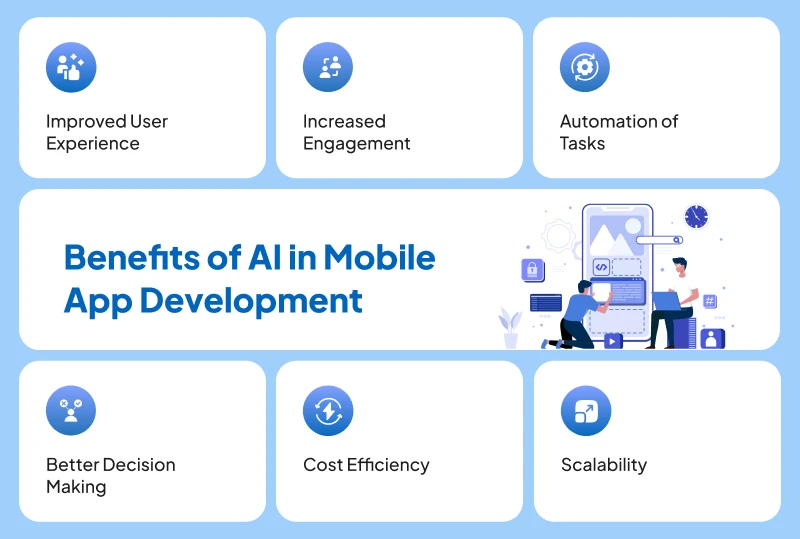
AI isn’t just about adding fancy features; it genuinely changes how apps perform and how users experience them. Let’s look at the real benefits it brings to the table:
Improved User Experience
AI makes apps feel intuitive and responsive. Instead of users figuring out the app, the app adapts to the user, offering relevant content, faster navigation, and smoother interactions that feel almost effortless.
Increased Engagement
When users see content that matches their interests, they’re naturally more likely to stick around. AI keeps users engaged by continuously delivering personalized suggestions, timely notifications, and meaningful interactions.
Automation of Tasks
From handling customer queries through chatbots to automating repetitive processes, AI reduces manual effort. This not only saves time but also ensures faster responses and consistent performance.
Better Decision Making
AI processes large volumes of data and turns it into actionable insights. Businesses can use this data to understand user behavior, identify trends, and make smarter decisions backed by real information rather than guesswork.
Cost Efficiency
By automating tasks and optimizing operations, AI helps reduce operational costs. This means businesses can achieve more with fewer resources while maintaining high-quality user experiences.
Scalability
As your app grows, AI helps it scale seamlessly. Whether it’s handling more users, more data, or more interactions, AI systems can adapt without compromising performance, making growth much easier to manage.
Common Use Cases of AI in Mobile Apps

From shopping to healthcare, AI is quietly improving experiences in ways we often don’t even notice. Let’s explore some real-world use cases:
E-commerce Apps
Ever noticed how shopping apps seem to know exactly what you’re looking for? That’s AI at work. It analyzes your browsing history, past purchases, and even what similar users are buying to show highly relevant product recommendations.
Example: You check out a pair of shoes, and suddenly your feed is full of similar styles you actually like.
Healthcare Apps
In healthcare, AI is helping apps go beyond basic tracking. It can assist in early diagnosis by analyzing symptoms, medical history, or even images like scans and reports.
Example: A health app suggesting possible conditions based on symptoms you enter and recommending whether you should consult a doctor.
Banking & Fintech
AI plays a huge role in keeping your money safe. It monitors transactions in real time and detects unusual patterns that could indicate fraud.
Example: Getting an instant alert when a suspicious transaction is detected, sometimes even before you notice it yourself.
Social Media Apps
We all agree to this. Whenever scrolling through your feed, you’ll rarely see random content. AI curates posts, videos, and ads based on what you engage with the most.
Example: Watching a few videos on a topic, and suddenly your feed is filled with similar content, and you can’t stop scrolling through.
Travel Apps
Planning a trip has become much easier thanks to AI. Travel apps use your preferences, past bookings, and search behavior to suggest destinations, hotels, and even the best time to book.
Example: Searching for flights once and then getting smart suggestions for cheaper dates, better routes, or hotel deals tailored to your trip.
How REVE Can Help
So, you understand the power of AI, but how do you actually bring it into your mobile app without the complexity? That’s where REVE Outsourcing Services comes in. With years of experience in software innovation, REVE helps businesses seamlessly integrate AI into their mobile applications, without needing to build everything from scratch. From strategy to deployment, our team ensures your app is not just functional, but future-ready.
We help businesses to access expert AI development without expanding in-house teams. Whether you need AI-powered chatbots, recommendation engines, voice solutions, or data-driven analytics, REVE offers end-to-end support, covering design, development, integration, and ongoing optimization. This means faster time-to-market, reduced development costs, and access to specialized expertise, all under one roof.
If you’re looking to build intelligent, scalable, and user-friendly mobile apps, REVE acts as a reliable technology partner, helping you turn AI ideas into real, impactful solutions. Get in touch with us for a one-to-one discussion.
Frequently Asked Questions