

Every incoming call arrives for a reason. Sometimes, the customer wants to check their order status, talk to support staff, or get help to sort a technical issue. Now, businesses get hundreds of thousands of such calls every single day. It’s almost impossible for teams to pick each call by hand and still keep the wait times reasonable. That’s when IVR call flow comes into the picture.
An IVR call flow is the path that a caller follows through automated menus. From the moment of the first greeting till they reach the right agent, department, or self-service option, the whole process is the IVR call flow. Interestingly, a well-planned call flow cuts down on unnecessary transfers, directs routine or repetitive queries to self-service, and keeps call volumes under control during peak hours.
Through this post, we will take you through how an IVR call flow is structured, the different types of call flow, how you can design one step by step, and the best practices worth following.
What is an IVR Call Flow?
An IVR call flow is a structured process or a step-by-step path that a caller takes through automated voice prompts, IVR menu options, and routing rules to get the information, service, or agent they need.
Let’s think of it as it happens in real life. It’s the path the caller takes after they dial a business phone number. As soon as the call gets picked up, a greeting plays, and the caller hears a few options like “Press 1 for billing, press 2 for sales, press 3 for technical support”… and so on. The caller responds by pressing a key on their phone, or they might simply say what they need if the system supports voice commands.
This process works in steps behind the scenes. The system reads the caller’s selection, collects the caller’s information such as account number, and then decides where the call will go next. The call could be directed to a self-service option, a live agent, or a specific department.
How Does an IVR Call Flow Work?
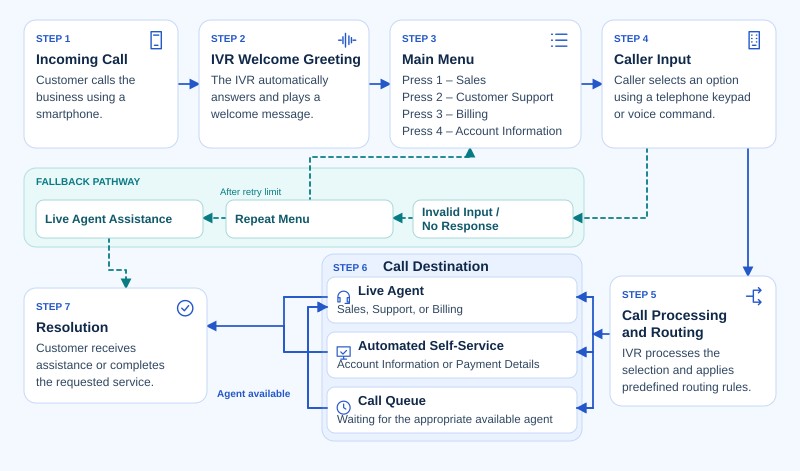
A call center IVR flow works by answering incoming calls, providing the callers with automated menu options, collecting their inputs, and then routing them to the right agent or destination. Here’s what happens at each stage of the process.
- The call initiates as the caller dials your business phone number.
- The IVR system receives the call and plays a greeting that usually includes the company name and a few options.
- Then the caller identification is performed through Automatic Number Identification or Caller Line Identification. If required, the system asks the caller for an account number or order ID as well.
- The caller then provides an input from the keypad by pressing a key or simply says their requirement. The system understands the input and pulls up the required information that the caller needs.
- Now, the automatic call routing comes into action. Based on the choice made by the caller and the information collected by the system, IVR routing sends the call to the most appropriate agent, department, self-service option, or even a queue.
What Are the Key Components of an IVR Call Flow?
Some of the major components of an IVR call flow are the greetings, menu options, caller input, routing rules, call queues, self-service options, and the fallback rules. These components together decide how the call flows.
Let’s understand each quickly:
Welcome Greeting
After dialing the business phone number, this is the first thing the caller hears from the business, which means it sets the tone for the call. Usually, greetings that include the name of your business or company, sound professional, and are to the point work well. Your greetings may also offer language choice to the callers or even share business hours.
IVR Menu Options
IVR menu provides callers with different options for service, such as billing, sales, support, etc. It works best when the wording is kept simple and short. Too many options often cause confusion among the callers and thus create frustration.
Caller Input
Callers can provide their input in two ways: pressing a key (DTMF) or simply saying what they want in their language. Besides this, the system can also ask for inputs like an account number, PIN, or ticket ID, so that it can get the right information for the caller.
Call Routing Rules
Routing rules basically decide where the call goes. These rules often make use of the caller’s menu choice, priorities, skills of the agent, etc., to perform their action.
Call Queues and Waiting Experience
Callers have to wait in queues when agents are busy with other calls. Hold announcements, estimated wait times (where supported), and queue position updates make that wait easier to handle. A callback option lets people hang up and still keep their place in line.
Self-Service Options
Callers with simple or routine queries do not need an agent. They can check a balance, track an order, make a payment, confirm an appointment, or get answers to common questions, all through the self-service options. Here’s a number worth noting: 62% of consumers are comfortable using automation for simple product or policy questions. (Source)
Fallback and Escalation Rules
Things don’t always go in a straight line, so your call flow should have a backup plan. Fallback rules cover invalid inputs, no response, and callers stuck in menu loops. They also cover transfers to a live agent and alternate routing during outages or outside business hours.
Understanding IVR Menu Structure
An IVR menu structure is the layout of options that are offered to the caller, and this layout decides the order of the options in which the caller hears them. If your menu structure is well designed, your callers will get to the right place in a few steps. However, if it’s a messy phone menu, then they may keep moving in circles.
Main Menu
It’s the first menu that covers the major services or departments callers ask for the most. Here you should keep the popular choices.
Submenus
These are the specific requests within a department. For example, if a customer picks up Billing from the main menu, then they can choose between payment info, a balance check, or a dispute submenu option.
Menu Depth
The first thing to consider about menu depths is that every extra layer adds time, so aim for two to three levels at most. If a caller has to press five keys to reach an agent, they are more likely to hang up.
Menu Hierarchy
When grouping options, do so by keeping in mind what the customer wants to do and not by how your company is organized.
| Menu Level | Options |
| Main Menu | 1. Sales 2. Customer Support 3. Billing 4. Account Information |
| Customer Support | 1. Technical Assistance 2. Service Complaints 3. General Queries |
| Billing | 1. Payment Information 2. Outstanding Balance 3. Billing Disputes |
Types of IVR Call Flows
There are many types of IVR call flows, including single-level, multi-level, self-service, intelligent, inbound, and outbound. The one that fits your operations depends on how many departments you have, how complex your calls are, and whether you want callers handling tasks on their own.
Single-Level IVR Call Flow
This type of IVR call flow is the simplest one. It has one main menu and a few options. A single-level IVR call flow works well for small businesses with straightforward call handling.
For example, “Press 1 for Sales, 2 for Support, 3 for Billing.” The caller picks one, and the call goes straight to that destination.
Multi-Level IVR System
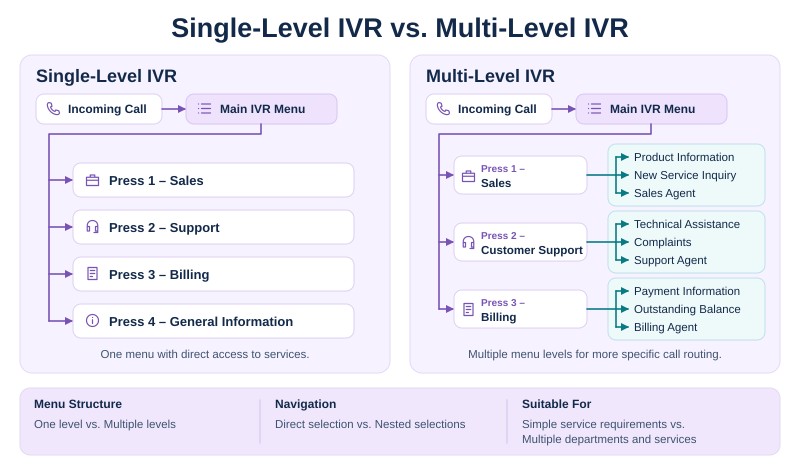
In a multi-level IVR, different nested menus are used to sort calls into more specific destinations. It’s suitable for businesses with multiple departments, products, and services. Each menu level narrows things down, bringing more accuracy in where the caller lands. However, it comes with a downside, i.e., the menu depth. So you need to be very careful while designing this, as too many layers can slow things down.
Self-Service IVR Call Flow
In this type of IVR call flow, callers finish the job without talking to anyone. Some of the most common examples are making a payment, checking a balance, looking up service status, or tracking an order. A self-service IVR menu simply cuts wait times for callers.
Intelligent IVR Call Flow
This type of call flow offers personalized service to callers by using caller data and routing calls intelligently rather than following predefined rules. It is integrated with other business systems such as CRM and ticketing systems, and can check past interactions to offer relevant self-service options or simply send the caller to the most suitable agent.
Inbound IVR Call Flow
This one particularly handles incoming customer calls. It focuses on identifying the caller, guiding them through the menu, routing the call, and getting the issue resolved.
Outbound IVR Call Flow
Outbound flows work for calls that are made by your business to the customers. The system calls the customer to deliver appointment reminders, payment notices, surveys, announcements, or other outreach. This one doesn’t follow any menu-based routing. The flow is built around delivering a message and collecting a quick response, like pressing 1 to confirm.
IVR Call Flow Examples for Different Businesses
IVR call flow can be different for different businesses. A bank, an online store, a telecom provider, and a clinic all receive different kinds of calls, so each one needs its own menu and routing. Here are some examples that show how a customer service call flow can be shaped around real call reasons.
IVR Call Flow Example for a Bank
Flow: Incoming Call → Language Selection → Banking Services Menu
- Press 1 for Account Information
- Press 2 for Card Services
- Press 3 for Loan Information
- Press 4 for Fraud or Lost Card Assistance
Example routing: Card Services → Lost Card → Authentication → Card Blocking Self-Service or Agent
Banks deal with sensitive requests such as account balance queries, so verification comes before anything else. Fraud and lost card calls sit right on the main menu because they’re urgent. Once the caller is authenticated, they can block the card on their own or speak to an agent.
IVR Call Flow Example for an E-Commerce Business
Flow: Incoming Call → Order Support
- Press 1 to Track an Order
- Press 2 for Returns and Refunds
- Press 3 for Payment Issues
- Press 4 to Speak with Customer Support
The system can pull up order details using an order ID or the caller’s registered phone number. If the number matches an account, the caller may not need to enter anything. They hear the latest status right away, which cuts down on agent calls for “where’s my order?”
IVR Call Flow Example for a Telecom Service Provider
Flow: Incoming Call → Language Selection
- Press 1 for Mobile Services
- Press 2 for Broadband
- Press 3 for Recharge or Billing
- Press 4 for Technical Support
Example routing: Technical Support → Service Type → Troubleshooting → Agent Transfer if Required
Telecom providers get high call volumes, so basic troubleshooting steps in the IVR can solve common issues like a slow connection or a failed recharge. If the problem is still there, the call moves to an agent who already knows the service type.
IVR Call Flow Example for a Healthcare Provider
Flow: Incoming Call → Appointment and Patient Services
- Press 1 for Appointment Booking
- Press 2 to Reschedule
- Press 3 for Prescription Information
- Press 4 for Billing
- Press 5 for Emergency Instructions
Emergency options need extra care. They should clearly direct callers to the right emergency resources, like a local emergency number, and never place them in a routine queue. Many healthcare providers play this message at the very start of the call, before any menu.
How to Design an Effective IVR Call Flow?
If you want to design and set up an effective IVR call flow, then you should begin with why your customers call your business. Create a small menu around those reasons, set simple and clear routing rules, add self-service where it fits, and plan for things that can go wrong. Test everything and keep optimizing based on how it is performing.
Step 1 – Identify Customer Needs and Call Reasons
Begin with the calls you receive every day. Identify the patterns of the calls, agent feedback, and customer complaints to find the most common reasons people call your business. Once you have them, sort those calls by purpose, like technical assistance, billing, order status, etc. This is important because your menu should reflect what callers actually want.
Step 2 – Define the Primary Menu Options
Now, keep the most requested services as the primary menu options. Ensure that your list is short and don’t hesitate to cut anything that doesn’t earn its place. Don’t put in any jargon; rather, keep the words plain, like “billing” or “track an order”.
Step 3 – Build a Logical Menu Hierarchy
Then group related services together. Only add submenus when they are really needed. Remember to keep the depth as low as possible because it will help the callers reach their destination with as little effort as possible.
Step 4 – Define Call Routing Rules
Decide how each call gets to the right place. Some of the most common options include:
- Department-based: route by the menu choice.
- Skill-based: match the caller to an agent with the right expertise.
- Language-based: send callers to agents who speak their language.
- Location-based: route by region or nearest office.
- Priority-based: move VIP or urgent calls up the line.
- Availability-based: send calls to agents who are free right now.
Remember, a well-planned call center call flow often mixes several of these.
Step 5 – Incorporate Self-Service Options
In this step, find the tasks callers can handle without an agent, such as checking account balances, making payments, tracking orders, checking service status, or confirming appointments. These are quick wins for your self-service options.
Step 6 – Create Fallback and Escalation Paths
Don’t underestimate this one. Plan for the moments when things don’t go smoothly:
- Invalid selection: replay the menu and offer help.
- No response: repeat the prompt once, then route to an agent or a default option.
- Department unavailable: offer another team, voicemail, or a callback.
- Live agent access: always give callers a clear way to reach a person.
Step 7 – Test and Optimize the IVR Workflow
It’s really important to test every menu path before going live and check that calls land where they should. After launch, review customer feedback and watch abandonment rates to spot where people drop off. Then use that call data to refine your options, wording, and routing over time.
What are the Benefits of an Effective IVR Call Flow?
A well-designed IVR simply gets callers to the right place faster, takes routine or repetitive queries off the agents, and keeps running the service even after hours. Nonetheless, it makes the overall customer experience smoother and easier to manage for your teams.
Faster Call Routing
A good IVR call flow takes callers to the right place without getting bounced around, which means fewer transfers and thus less frustration. Here’s a telling stat: 75% of consumers rank long waiting times as a major customer service frustration. (Source: Gradient Labs)
Reduced Agent Workload
It handles routine requests like balance checks or order status automatically, which means agents spend less time on the same repetitive questions and more time on issues that need a human.
Improved Customer Experience
A clear, predictable menu makes it easy for callers to find what they need, which means they aren’t left guessing which option fits. It may surprise you, but 85% of consumers say poor customer service has caused them to spend less or stop doing business with a brand. (Source: Genesys)
Better Call Management
Intelligent IVR call flow distributes incoming calls across departments, queues, and available agents, without keeping any single team getting overburdened.
Greater Availability
Self-service options and automated information work around the clock, which means customers can pay a bill, check a status, or get basic answers even when your office is closed. The numbers back this up: 32% of customers prefer self-service portals as one of their top customer service channels. (Source: Capgemini)
Improved Operational Efficiency
When there is peak call traffic, the IVR absorbs a lot of the load. Contact centers can handle more calls without adding agent headcount.
Consistent Customer Communication
Every caller hears the same greeting, instructions, and information, which means the system delivers consistent information and cuts down on mistakes or mixed answers.
IVR Call Flow Best Practices
The best IVR call flows are simple, short, and clear. You should ensure that menus are easily interpretable, provide callers with a clear and direct way to reach a person, and keep tuning the IVR flow based on how it performs with different calls.
Keep Menu Options Short and Clear
Don’t make your IVR options sound like long announcements. If callers have to listen to a paragraph before they can press anything, they’ll tune out or hang up.
Limit the Number of Options
Always try to stick to a manageable number of choices at each level, ideally four or five. Past that, people forget the early options and end up guessing.
Avoid Too Many Menu Levels
Ensure you put frequently used services as early in the flow as possible. The fewer layers between a caller and their answer, the better.
Offer a Live Agent Option
Keep in mind that self-service doesn’t solve everything. Make sure callers always have a clear way to reach a real person when they need one. A recent report found that 27.2% of consumers prefer human support rather than automated interactions.
Use Natural and Conversational Prompts
Try to write prompts the way you’d talk; don’t make them sound robotic. Avoid stiff, overly formal, or complicated instructions. A simple example: “What can we help you with today?”
Provide Language Selection
If you serve a multilingual customer base, offer language options right at the start, so callers aren’t stuck in a language they don’t follow.
Personalize the Caller Experience
If your system supports it, use caller data to recognize returning customers and offer relevant options, like “Are you calling about your recent order?”
Make the IVR Accessible
Your IVR should also be accessible for those who may have hearing, speech, or cognitive limitations. Use clear prompts, give people enough time to respond, and offer alternatives, like a direct route to an agent.
Provide a Callback Option
Don’t ignore the fact that long queues frustrate people. Where the platform supports it, let callers request a callback instead of waiting on hold.
Monitor and Improve the Call Flow
Track how your IVR performs, including drop-off points, abandonment rates, and the most-used options. Use that call analytics data to adjust menus, prompts, and routing as customer behavior changes.
Common IVR Call Flow Mistakes to Avoid
The most common IVR mistakes that businesses make are overloaded menus, too many layers, confusing words, and no easy way to reach an agent. Each of these mistakes creates friction and results in frustrated callers, more waiting time, and, of course, more people hanging up.
- Too many menu options often lead callers to the wrong routing.
- Multiple submenu levels increase call abandonment rates.
- Unclear or highly technical language creates confusion among the callers.
- Hiding the agent option makes callers angry.
- Misrouted calls result in longer call handling time.
- No option for callback or voicemail leaves callers stuck, or they give up.
- Ignoring drop-off points and complaints affects call center performance.
- Skipping pre-launch testing often costs much more later.
In essence, by making the above mistakes, you make callers put in more effort to get help, which affects their experience.
How to Measure IVR Call Flow Performance?
You can measure whether an IVR call flow is working or not by tracking a few important call center metrics, such as how many calls it resolves, how many callers drop off, and how smoothly calls reach their right destination. Together, these metrics can show you the overall picture of how the call flow helps callers and where it gets in their way.
| Metric | What it measures |
| IVR Containment Rate | Calls resolved within the IVR without agent assistance |
| IVR Abandonment Rate | Calls disconnected before reaching the intended destination |
| Call Transfer Rate | Calls transferred from one destination to another |
| Self-Service Completion Rate | Callers who successfully complete automated tasks |
| Average IVR Navigation Time | Time callers spend navigating the menus |
| First Call Resolution | Calls resolved without requiring another interaction |
| Call Routing Accuracy | Calls directed to the appropriate destination |
| Customer Satisfaction | Caller experience with the automated call journey |
If you see a high containment rate, don’t take it for granted; it can also be high if callers are stuck in the system because they can’t reach an agent when they need one, and that’s certainly not a win. Check other parameters also including abandonment rate, customer satisfaction, and first-call resolution to understand the complete picture.
So in simple words, review the numbers regularly, compare them at different intervals, and use the patterns to decide what to fix first.
How Modern IVR Systems Improve Call Flow Automation
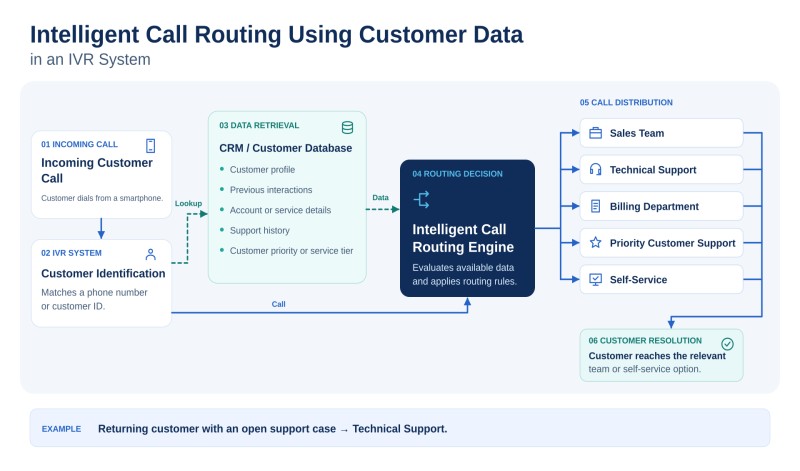
Modern IVR systems come with intelligent and advanced features that go beyond fixed keypad menus. These systems use caller data, speech recognition, and system integrations to provide more flexibility in call handling. The thing is that traditional IVR systems stick to preset menus, while advanced platforms add smarter features on top.
Modern IVR platforms can perform a lot more than what traditional ones can do. Here’s a quick glance:
- Intelligent call routing: Calls are directed based on caller data, the caller’s requirements, agent skills, and availability, rather than just a menu choice.
- Speech recognition: Callers need not work through a menu or press keys; rather, they can simply say their query or what they need to the system.
- CRM integration: With integration, the system pulls relevant customer information or records so that callers are routed and handled with context.
- Caller identification and personalization: It recognizes returning callers and offers relevant options up front.
- Automated self-service: Callers can handle payments, status checks, and similar tasks on their own.
- Queue management: Hold messages, wait time updates, and callback options make waiting easier.
- Call analytics and reporting: Dashboards show drop-off points, routing accuracy, and call trends.
- AI-powered voicebots: Where available, these handle open-ended conversations and resolve simple requests without an agent.
- Omnichannel integration: Voice connects with chat, email, and messaging so customers can switch channels without starting over.
How to Choose an IVR Solution for Your Business?
Your choice of the right IVR solution should be in accordance with whether the solution can adapt as your business changes, connect to your existing tools, and scale as call volume grows. We have prepared some questions that you can use to compare your options
- Can your team change menus, routing rules, and workflows without waiting on a vendor?
- It supports department, skill, language, priority, and availability-based routing.
- Can the IVR pull up or update customer information in your CRM or other systems?
- It handles automated payments, account inquiries, status checks, and workflows specific to your business.
- Monitor call routing, IVR performance, abandonment, and caller behavior.
- The system can handle growing call volumes and fits your deployment needs, whether that’s cloud, on-premises, or a mix.
- IVR works alongside queues, agent management, call recording, dashboards, and other contact center tools.
If you are considering IVR solutions for your call center, then give REVE Cloud PABX and Contact Center Solution a try. Our solution comes with an excellent combination of basic and advanced contact center tools, including an AI-powered Voicebot and Chatbot that automates your operations incredibly. We offer free, personalized trials. So if you want a hands-on experience, then book here.
Frequently Asked Questions
Kanika is a content writer with a B.Tech background and 13+ years of experience turning complex tech into content people actually enjoy reading. She currently works in the telecom space — vast, layered, and not for the faint-hearted, and that deep exposure has given her a sharp eye for technology and how it works. Her thing is making complicated stuff simple, whether it's a deep-dive blog post or a punchy social caption. Outside of work, she recharges by traveling, painting, and meditating.
Power your messaging, voice, and customer engagement with REVE’s enterprise-grade communication platforms.
Get a Demo